

Pass CSA Exam Latest Practice Questions Updated on Apr 18, 2026
ServiceNow CSA Study Guide Archives
NEW QUESTION # 102
What is the definition of a group?
- A. An escalation pod
- B. A collection of subject matter experts
- C. A department
- D. A team of users
- E. A collection of users
Answer: E
Explanation:
In ServiceNow, aGroupis acollection of userswho share common responsibilities and access rights within the system. Groups are primarily used to facilitate:
Role-Based Access Control (RBAC):Assigning roles and permissions collectively to a set of users.
Task Assignment:Groups can be assigned to handle incidents, change requests, and approvals.
Notification Management:Groups can be used for sending system notifications to multiple users at once.
C: A collection of users
Agroupin ServiceNow consists of multiple users who work together on tasks, approvals, or system activities.
Groups simplify user administration by allowing permissions and responsibilities to be assigned collectively instead of individually.
Examples of groups:
Service Desk(handles incident tickets)
Change Advisory Board (CAB)(approves change requests)
HR Team(manages HR cases)
A: An escalation pod
ServiceNow doesnotuse the term"escalation pod"to define a group.
Escalations are handled through priority rules and workflows, not groups.
B: A department
Adepartmentis an organizational unit (e.g., HR, IT, Finance), while agroupis a functional collection of users.
Departments and groups are separate entities in ServiceNow.
D: A collection of subject matter experts
While some groupsmayconsist of SMEs, this isnot the definitionof a group.
Groups can have users of different expertise levels, not just experts.
E: A team of users
Although groups may act as "teams," the officialServiceNow definitionof a group isa collection of users, which is more precise.
"Team" is a more informal term, while "group" is the structured term used in the platform.
References:Official ServiceNow Documentation:Groups and Users
ServiceNow Administration Guide:User and Group Management
NEW QUESTION # 103
What is the primary objective of the Display Business Rule?
- A. To set files to mandatory, hidden, and read-only
- B. To use a shared g_scratchpad object, which can be sent to the client, as part of the form
- C. To monitor fields on a form, and provide feedback
- D. To define what happens on a form, when a particular fled changes
Answer: B
Explanation:
ADisplay Business Ruleis aserver-side scriptin ServiceNow thatruns before the form is displayed to the user.
Populatesg_scratchpad(Shared Data Object)
g_scratchpadis atemporary objectthat storesserver-side dataand makes it available toclient-side scripts (e.g., Client Scripts, UI Policies).
Example: If you need topass user-specific information(e.g., "Manager Name" or "User Role") from the server to the client, you useg_scratchpad.
Runs Before the Form Loads
Executesbefore data is sent to the client, ensuring thatpreprocessed datais available.
Improves performanceby reducing unnecessary server calls.
Does Not Modify Records Directly
Unlike other Business Rules (Before,After,Async),Display rules do not modify the recordbeing loaded.
They only preparedata for the client-side.
Primary Purpose of a Display Business Rule:
Example of a Display Business Rule:// Runs before the form loads
(functionexecuteRule(current, gScratchpad) {
gScratchpad.manager_name= current.manager.getDisplayValue();
})(current, gScratchpad);
This scriptretrieves the manager's namefrom the server andmakes it available on the client- sideusingg_scratchpad.manager_name.
AClient Scriptcan then useg_scratchpad.manager_nameto display the manager's name in a fieldwithout making another server call.
A: To monitor fields on a form, and provide feedbackIncorrect- This describesClient Scripts and UI Policies, not Display Business Rules.
C: To set fields to mandatory, hidden, and read-onlyIncorrect- These actions arehandled by UI Policies or Client Scripts, not Display Business Rules.
D: To define what happens on a form when a particular field changesIncorrect- This is the function of anOnChange Client Script, not a Display Business Rule.
Incorrect Answer Choices Analysis:
ServiceNow Docs - Business Rules Overview#Display Business Rules
ServiceNow Docs - g_scratchpad Usage#Using g_scratchpad in Display Business Rules Official ServiceNow Documentation References:
NEW QUESTION # 104
ServiceNow is a single-instance, multiple tenant architecture?
- A. False
- B. True
Answer: A
Explanation:
ServiceNow follows a single-instance, single-tenant architecture, not a multiple-tenant architecture. This means:
Single-Instance:
Each ServiceNow instance is a unique, independent environment for a customer.
All customers have their own dedicated instance with their own custom configurations, data, workflows, and applications.
ServiceNow instances are hosted in a multi-instance cloud model rather than a multi-tenant model.
Single-Tenant Model (Multi-Instance Architecture):
Unlike multi-tenant architectures (where multiple customers share the same application and database), ServiceNow provides each customer with a separate, isolated instance.
This ensures data security, performance isolation, and customization flexibility.
Each instance has its own data storage, configuration, and upgrade schedule, reducing risks associated with shared environments.
Why ServiceNow Uses Multi-Instance Instead of Multi-Tenant:
Security & Data Isolation: Since each customer has an independent instance, there is no risk of data leakage between tenants.
Customization & Flexibility: Customers can customize their instance freely without affecting others.
Performance & Scalability: Each instance can be scaled independently, ensuring optimal performance.
Why Option B (False) Is Correct?
ServiceNow does NOT use a multiple-tenant architecture. ❌
ServiceNow follows a single-instance, single-tenant (multi-instance) model. ✅ Each customer has a dedicated instance with isolated resources and configurations. ✅ Why Option A (True) Is Incorrect?
A multi-tenant architecture means multiple customers share the same application/database with logical separation, which is NOT the case in ServiceNow.
ServiceNow instead provides separate instances for each customer, meaning it is not a true multi-tenant system.
Reference from Certified System Administrator (CSA) Documentation:
ServiceNow Product Documentation - Multi-Instance Cloud Model
https://docs.servicenow.com
ServiceNow Community - Single-Tenant vs. Multi-Tenant Explained
ServiceNow Best Practices - Security & Instance Architecture
NEW QUESTION # 105
When importing data, what happens to imported rows, if no coalesce field is specified?
- A. Duplicate rows are rejected from the import.
- B. All rows are treated as new records, but errors will be flagged in the import log.
- C. All rows are rejected from the import, as coalesce field is required.
- D. All rows are treated as new records. No existing records are updated.
Answer: B
Explanation:
Reference: https://developer.servicenow.com/dev.do#!/learn/learning-plans/quebec/new_to_servicenow
/app_store_learnv2_importingdata_quebec_coalescing
NEW QUESTION # 106
What is the path an Administrator could take to view the fulfillment stage task list for an order placed by a
user?
- A. REQ (Number)>RITM (Number)>PROCUREMENT (Number)
- B. REQ (Number)>RITM (Number)>TASK (Number)
- C. RITM (Number)>REQ (Number)>PROCUREMENT (Number)
- D. FULFILLMENT (Number)>RITM (Number)>TASK (Number)
Answer: B
NEW QUESTION # 107
What is the platform name for the Group table?
- A. SyS_USer_group
- B. group
- C. sys_groups
- D. Sys_group
Answer: A
NEW QUESTION # 108
To see what scripts, reports, and other application artifacts will be in a published application:
- A. Enter the name of the Application in the Global search field
- B. Open the artifact records individually to verify the value in the Application field
- C. Open the list of Update Sets for the instance
- D. Examine the Application Files Related List in the application to be published
Answer: D
NEW QUESTION # 109
Refer to the exhibit.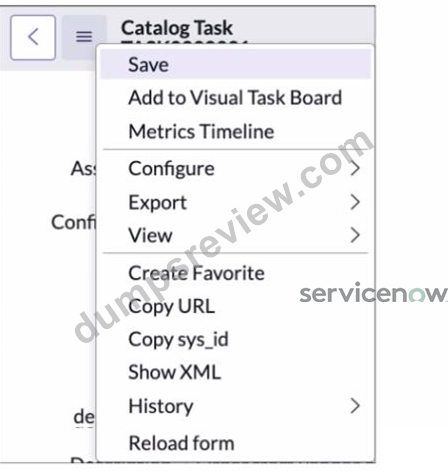
Which path would you take to access the table configuration page from a form?
- A. The Form Context menu > View > Table
- B. The Form Context menu > Configure > Dictionary
- C. The Form Context menu > View > Show Table
- D. The Form Context menu > Configure > Table
Answer: D
NEW QUESTION # 110
Which one of the following statements describes the purpose of a Service Catalog workflow?
- A. A Service Catalog workflow is used to drive complex fulfillment processes and sends notifications to defined users or groups
- B. A Service Catalog workflow generates three basic components: item variable types, tasks, and approvals
- C. A Service Catalog workflow generates three basic components: item variable types, tasks, and notifications
- D. Although a Service Catalog workflow cannot send notifications, the workflow drives complex fulfillment processes
Answer: A
NEW QUESTION # 111
A form displays information about one record at the top, for example a User, Additional records, which are associated with that User, are displayed on tabs at the bottom of the form. What are those tabs called?
- A. Additional Info
- B. Related Links
- C. Related Lists
- D. More Info
Answer: C
Explanation:
In ServiceNow, when viewing a record in a form view, the top section of the form displays details about that record, while the bottom section (if enabled) displays related records that are associated with it.
These sections at the bottom of the form are called Related Lists.
Key Characteristics of Related Lists:
Displays Records from Related Tables
Related Lists show one-to-many or many-to-many relationships between records.
Example: On a User form, Related Lists might include:
Groups (shows all groups the user belongs to)
Roles (lists roles assigned to the user)
Incidents Assigned (shows all incidents assigned to the user)
Automatically Generated Based on Table Relationships
ServiceNow automatically generates Related Lists based on Reference Fields, Many-to-Many (M2M) tables, or Database Views.
Admins can configure which Related Lists appear via Form Layout settings.
Configurable in Form Design & UI Policies
Related Lists can be enabled or disabled using:
Form Layout (Configure → Related Lists)
UI Policies and Client Scripts
Incorrect Answer Choices Analysis:
A . Additional Info
❌ Incorrect - There is no "Additional Info" feature in ServiceNow related to form layouts.
B . More Info
❌ Incorrect - This is not a term used in ServiceNow for displaying related records.
C . Related Links
❌ Incorrect - Related Links provide quick actions (e.g., "Create New Task") but do not display related records.
Official ServiceNow Documentation Reference:
ServiceNow Docs - Related Lists
📖 Related Lists Overview
ServiceNow Docs - Configuring Related Lists on Forms
📖 How to Configure Related Lists
NEW QUESTION # 112
Groups are stored in what table?
- A. Group [sn_sys_user_group]}
- B. User Group [user_groups]
- C. Groups [sys_user_groups]
- D. Group [sys_user_group]
- E. User Groups [sn_user_groups]
Answer: D
Explanation:
In ServiceNow,groupsare stored in thesys_user_grouptable. This table definesgroups of userswho share common responsibilities, such asIT support teams, HR teams, or security teams.
Groups are used toassign roles and permissionsto multiple users at once.
Common groups includeService Desk, IT Support, Change Advisory Board (CAB), and HR teams.
Thesys_user_grouptable is linked tosys_user(Users) andsys_user_role(Roles).
B: Group [sn_sys_user_group]- No such table prefix (sn_) exists for user groups in ServiceNow.
C: User Group [user_groups]- Incorrect table name; ServiceNow follows thesys_naming convention.
D: User Groups [sn_user_groups]- Not a valid ServiceNow table.
E: Groups [sys_user_groups]- Incorrect pluralization; ServiceNow tables typically usesingular names(e.g., sys_user_group).
ServiceNow sys_user_group Table Documentation
ServiceNow CSA Training Module:"User and Group Administration"
Key Details about sys_user_group:Why Other Answers Are Incorrect:References from Certified System Administrator (CSA) Official Documentation:
NEW QUESTION # 113
When using the Data Pill Picker, use which keys to dot-walk (6 fields in other tables?
- A. Arrows
- B. Ctrl <, Ctrl >
- C. Ctrl c, Ctrl
- D. Plus, Minus
- E. Shift F4, Shit FS
Answer: B
Explanation:
When using theData Pill Pickerin Flow Designer,dot-walkingis used to access fields inrelated tables.
The shortcut fordot-walkingin theData Pill Pickeris:#Ctrl<and Ctrl>
Dot-walkingallows users toaccess fields in referenced records.
For example, if you have anIncidentrecord with aCallerfield (which references thesys_usertable), you candot- walkto theCaller's emailusing:
What is Dot-Walking?CopyEdit
incident.caller.email
This is useful whenbuilding conditions, flows, and reportsin ServiceNow.
A: Arrows- Arrow keys are used for navigation, but they do not support dot-walking.
B: Plus, Minus- These keys arenot used for dot-walkingin ServiceNow.
C: Ctrl C, Ctrl- These are copy-paste shortcuts, unrelated to dot-walking.
E: Shift F4, Shift F5- These do not have any function related to dot-walking.
ServiceNow Dot-Walking & Data Pill Picker
ServiceNow CSA Training Module:"Using Dot-Walking in Flow Designer and Reporting" Why Other Answers Are Incorrect:References from Certified System Administrator (CSA) Official Documentation:
NEW QUESTION # 114
Which section of the ServiceNow UI allows you to perform a global search?
- A. List pane
- B. Application Navigator
- C. Content frame
- D. Banner frame
Answer: D
NEW QUESTION # 115
For your implementation, the following tables. are extended fram each ofher:
* Incident table is extended from Task table.
* Super Incident table is extended from Incident table,
In this situation, which table(s) are P arent, Child and Base tables?
Choose 5 answers
- A. Super Incident table is a Base table
- B. Task table is a Child table
- C. Super Incident table is a Parent table
- D. Incident table is. a Parent table
- E. Task table is a Parent table
- F. Incident table is a Base table
- G. Task table is a Base table
- H. Incident table is a Child table
- I. Super Incident table is a Child table
Answer: D,E,G,H,I
Explanation:
InServiceNow Table Inheritance, tables can be categorized asBase, Parent, or Childdepending on how they relate to other tables.
Task Table:
Base Table:Since it isnot extended from any other table, it serves as the foundation for other tables.
Parent Table:Because theIncident tableextends from Task, Task acts as aParenttable.
Incident Table:
Parent Table:BecauseSuper Incident extends from Incident, it becomes aParentto Super Incident.
Child Table:Since it extends fromTask, it is aChildtable to Task.
Super Incident Table:
Child Table:Because it extends fromIncident, it is aChildtable.
Not a Parent or Base Tablebecause no other table extends from it.
Understanding Table Relationships in the Given Scenario:Final Table Classification:Table Base Table?
Parent Table?
Child Table?
Task
Yes
Yes
No
Incident
No
Yes
Yes
Super Incident
No
No
Yes
A: Incident table is a Base table #Incorrect
TheTask tableis the Base table, not Incident.
E: Super Incident table is a Parent table #Incorrect
No table extends from Super Incident, so itcannot be a Parent table.
F: Super Incident table is a Base table #Incorrect
It is extended fromIncident, meaning itis not a Base table.
I: Task table is a Child table #Incorrect
Sinceno other table extends to Task, it isnot a Child table.
Table Inheritance in ServiceNow
Extending Tables
Why Other Options Are Incorrect?Official ServiceNow Documentation Reference:
NEW QUESTION # 116
Which element is used to track items not saved with a field, in a record?
- A. Dictionary
- B. List Editor
- C. Activity formatter
- D. Sidebar
Answer: C
Explanation:
Explanation
The activity formatter provides an easy way to track items not saved with a field in the record, such as journal fields like comments and work notes1.
ReferencesFormatters and Related Lists
NEW QUESTION # 117
What are the three components of a filter condition?
- A. Field
- B. Table
- C. Value
- D. Operator
Answer: A,C,D
Explanation:
In ServiceNow, a filter condition consists of three primary components:
Field - The specific column (attribute) in a table that you want to filter by.
Example: State, Priority, Category, Created Date
Operator - Defines the comparison condition between the Field and the Value.
Example: is, is not, contains, starts with, greater than, less than
Value - The actual data that the filter is looking for.
Example: High (for Priority), New (for State), IT Support (for Category) Example of a Filter Condition in ServiceNow:
If you want to filter Incident records where the State is New, the filter condition would be:
Field: State
Operator: is
Value: New
Why the Other Option is Incorrect?
A . Table -
A table is where data is stored, but it is not a component of a filter condition.
Filters are applied on a table but do not include the table itself in the condition.
Reference from Certified System Administrator (CSA) Documentation:
ServiceNow Docs: Filtering Data in Lists and Reports
https://docs.servicenow.com/en-US/bundle/utah-platform-user-interface/page/use/using-lists/concept/filtering-lists.html ServiceNow CSA Official Training Guide (Filtering and Searching Data) This confirms that Field, Operator, and Value are the three core components of a filter condition.
NEW QUESTION # 118
What is NOT an example of a UI Action?
- A. list Buttons
- B. Related Links
- C. Form buttons
- D. Search
Answer: A
NEW QUESTION # 119
What actions are required to refine the number of records displayed in a list view?
- A. Select the filter icon and apply conditions
- B. Modify field properties and duplicate form views
- C. Right-click to configure relationship list
- D. Add embedded lists and form annotations
Answer: A
NEW QUESTION # 120
Which actions can you take to open the Context Menu on a list, form, or column? (Choose 2 answers)
- A. Double click on the list, form, or column heading
- B. Select the Context Menu icon
- C. Select the Context Menu related link
- D. Use Ctrl+M command
- E. Right-click on the list, form, or column heading
Answer: B,E
Explanation:
# The Context Menu in ServiceNow provides quick access to actions related to a list, form, or column.
Ways to Open the Context Menu:
* Select the Context Menu icon (# A) - Located at the top of lists and forms.
* Right-click on the list, form, or column heading (# D) - Opens the menu for quick actions.
* Option B (Double click on the list, form, or column heading) is incorrect because double-clicking typically edits inline fields.
* Option C (Use Ctrl+M command) is incorrect because no such shortcut exists.
* Option E (Select the Context Menu related link) is incorrect because there is no such link in ServiceNow.
# Reference: ServiceNow UI Navigation & Context Menus
NEW QUESTION # 121
When using Flow Designer what is the Flow Execution initiated by?
- A. An execution data pill
- B. A trigger
- C. Allow logic
- D. An existing subflow
Answer: B
Explanation:
Explanation
A trigger is an activity that, once specified, automatically initiates a flow1. A trigger specifies the conditions that start running the flow, such as creating a record in a specified table, receiving an inbound email, or reaching an SLA target1.
References
Flow trigger types - Product Documentation: San Diego - ServiceNow1
NEW QUESTION # 122
What is the difference between a UI Policy and Data Policy?
- A. Data Policies run when data is entered through the form, by an Import Set, or by web services, while UI Policies are set only by web services
- B. Data Policies can be converted into UI Policies, but UI Policies cannot be converted into Data Policies
- C. Data Policies run regardless of how data is entered into ServiceNow, while UI Policies are used for form interactions
- D. Data Policies run only after UI Policies run successfully
Answer: C
NEW QUESTION # 123
What section on a task record is used to see the most recent updates made to a record?
- A. Related List
- B. Timeline
- C. Audit Log
- D. Activity Stream
Answer: D
NEW QUESTION # 124
What icon do you use to change the icon and color on a Favorite'?
- A. Clock
- B. Triangle
- C. Pencil
- D. Star
Answer: C
NEW QUESTION # 125
What kind of data can Import Sets use to populate tables in ServiceNow?
- A. CSS, SOAP, and Excel
- B. SOAP, REST, and XML
- C. XML, SOAP, and CSS
- D. XML. CSV, and Excel
Answer: D
Explanation:
https://docs.servicenow.com/bundle/orlando-platform-administration/page/administer/import-sets/concept
/c_ImportDataUsingImportSets.html
NEW QUESTION # 126
What is the Import Set Table?
- A. A repository for Update Set information
- B. A staging area for imported records
- C. A table where data will be placed, post-transformation
- D. A table that determines relationships
Answer: B
Explanation:
InServiceNow, anImport Set Tableis atemporary staging areawhere raw data is storedbefore it is transformed and moved into a target table. It is primarily used indata import processesto ensure data integrity and allow transformation before committing data to production tables.
Stores incoming data from external sources(e.g., CSV files, Excel files, APIs, LDAP, etc.).
Acts as a temporary staging areabefore records are mapped and transformed into atarget table(e.g.,incident, cmdb_ci,problem).
Allows validation and error handlingbefore final data migration.
Uses Transform Mapsto determine how fields in the import set relate to fields in the target table.
Key Functions of an Import Set Table:
Data is importedinto anImport Set Tablefrom an external source.
TheImport Set Table temporarily stores the datawithout affecting existing records.
ATransform Mapis applied to move and modify the data before inserting it into the correct table.
Once transformation is complete, the data is transferred to thetarget table, and the Import Set Table can be cleared.
Example Workflow of an Import Set:
(A) A table where data will be placed, post-transformation - Incorrect
Thetarget table(e.g.,incident,cmdb_ci,problem) holds the dataaftertransformation.
TheImport Set Table is only a temporary staging areabefore transformation occurs.
(B) A table that determines relationships - Incorrect
Relationship tables(e.g.,cmdb_rel_ci) definedependencies between recordsbut are not used for data import.
Import Set Tables do not determine relationships between records.
(C) A staging area for imported records - Correct
Import Set Tables temporarily store incoming recordsbefore processing.
The data is transformed and mappedbefore being inserted into the final target table.
This ensuresdata integrity and consistency.
(D) A repository for Update Set information - Incorrect
Update Sets (sys_update_set) store changes to configurations, such as scripts, workflows, and UI policies.
Import Set Tables are used for data imports, not Update Sets.
Explanation of Each Option:
Always review data in the Import Set Table before applying transformationsto avoid incorrect data entry.
Use Transform Mapsto define field mappings between Import Set Tables and target tables.
Monitor Import Logs(sys_import_set_run) for errors or incomplete data.
Delete old Import Set dataperiodically to improve performance and avoid unnecessary storage usage.
Additional Notes & Best Practices:
ServiceNow Docs: Import Set Overview
https://docs.servicenow.com
ServiceNow Community: Best Practices for Import Set Management
https://community.servicenow.com
References from Certified System Administrator (CSA) Documentation:
NEW QUESTION # 127
......
CSA Questions Prepare with Learning Information: https://www.dumpsreview.com/CSA-exam-dumps-review.html
Download CSA Mock Test Study Material: https://drive.google.com/open?id=1r-8-LZqC55CHjD1qHVCsfHMLxFI2C89d
